
The Capacity view
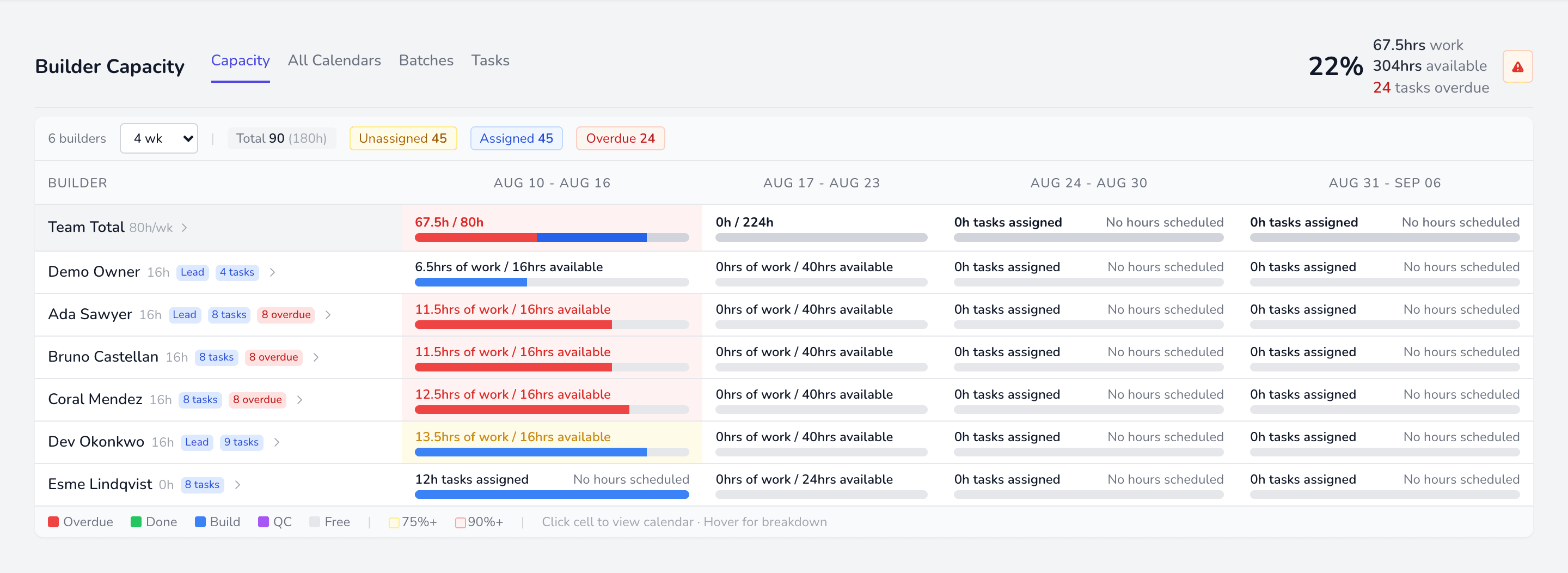
A grid of builders down the side and weeks across the top. Each cell is one builder’s week.
Reading a cell
Section titled “Reading a cell”Each cell shows hours booked against hours available, with a bar broken into segments:
| Colour | Segment |
|---|---|
| Red | Overdue — should already be done |
| Green | Completed |
| Blue | Still to build |
| Amber | Stopped — owed, but waiting on somebody |
| Purple | QC time |
Amber is carved out of the blue rather than added beside it: stopped work is still owed, it just cannot be picked up as things stand.
Build hours leave the bar when the build finishes, not when the task does. A task waiting on its QC check keeps its QC hours and drops its build hours, because nobody has to build it again.
The bar is proportional to that builder’s available hours, so a bar running to the end means fully booked.
Who is actually crewed
Section titled “Who is actually crewed”A banner above the grid reports how much of the open work is fully crewed, split three ways:
| Need a builder | Nobody is on it at all |
| Need a QC person | A builder is set, but the task needs QC and no checker is named |
| Ready | Fully crewed |
The two gaps are counted separately because they need different actions, and each chip filters Tasks down to exactly that set. A per-builder need QC person badge shows the same thing for work someone already holds — they cannot finish those as they stand.
Unassigned Overdue
Section titled “Unassigned Overdue”A separate row, pinned at the top, for work that is late and belongs to nobody. It is the first thing to clear: it counts against no builder, so it is easy to miss.
Getting from here to the work
Section titled “Getting from here to the work”Click a cell to jump to that builder’s week in All Calendars. The overdue and no date pills on each row jump to Tasks, filtered to exactly those tasks.